
Start with the pet you actually want
Some people want to choose between a cat, a dog, and a collection of other animals. Others already know the answer: a frog, please. That preference is a useful place to start because these apps have different personalities.
Pixel Pals includes a variety of pets, including cats, dogs, an axolotl, an otter, and other animals. You can customize their names. Feed The Frog keeps its attention on one pixel frog and the different things it does, from an everyday blink to a wizard animation. Pixel Pals and Feed The Frog are independently developed apps.
Compare where the companion lives
| What matters to you | Feed The Frog | Pixel Pals |
|---|---|---|
| Pet collection | One frog, five animation sets | A range of animal companions |
| Screen experience | Dynamic Island and Lock Screen Live Activities | Home Screen and Lock Screen customization, plus Live Activities |
| Progress to explore | Feeding milestones and frog animations | Its own pet and customization features |
| A good starting point | You want a frog you can feed and check on | You want to explore different animals and screen layouts |
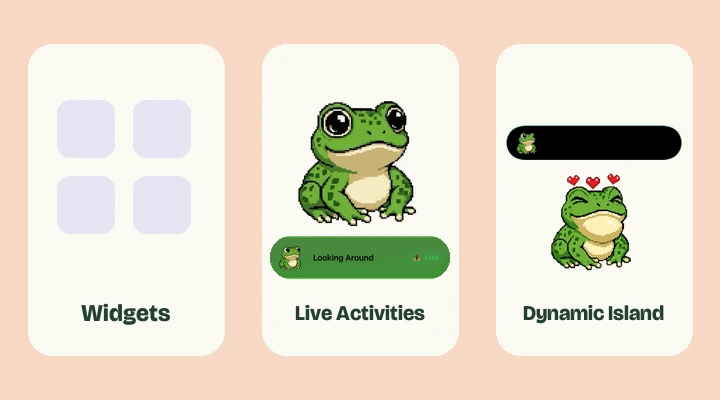
If a Home Screen widget is essential to you, pay attention to that row. Feed The Frog starts its screen companion as a Live Activity. You do not place it among your app icons through the widget gallery.
What a check-in with Feed The Frog looks like
Turn on the Live Activity, choose an available animation, and let your frog share the screen. Touch and hold the Dynamic Island to expand the activity. When feeding is ready, tap Feed and watch the frog catch a fly.
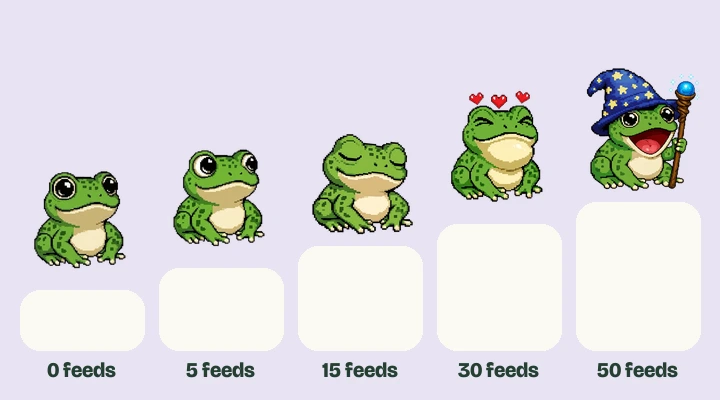
Each successful feed contributes to the animation milestones. Blinking is included from the start, and Looking Around unlocks through feeding. Sleeping, Catching Fly, and Wizard Staff add more to the collection. You can see all five in the animation playground before downloading.
Understand the purchase before collecting
Feed The Frog is free to download and offers an optional one-time All Frog Packs purchase. The three premium Live Activity animations need both the purchase and their feeding milestones. There is no recurring subscription for that pack.
That makes the distinction straightforward: feeding earns progress, while the purchase provides access to the premium selections. Read the unlock guide if you want the exact milestones. Compare the other app’s own purchase options with what you plan to use, rather than assume every pet or customization is included in the download.
Choose the experience that fits your phone
Feed The Frog requires iOS 17.6 or later. Its Island pet needs Dynamic Island hardware, including the vertical presentation on iPhone Duo. A supported iPhone without an Island can still use the Lock Screen activity and the app.
Choose Pixel Pals if its animal selection and customization are what you are after. Choose Feed The Frog if the frog and its little collection of moods are the appeal. Neither choice needs to be a major project. Try the preview, see which pet you enjoy looking at, and check that it appears on the screen you want.
A few more questions
Is Feed The Frog the same app as Pixel Pals?
No. They are independently developed iPhone apps. Feed The Frog centers on a frog with five animation sets. Pixel Pals offers a wider range of animal companions and screen customization.
Can I have a pixel pet without a Dynamic Island?
Yes. On a supported iPhone running iOS 17.6 or later, Feed The Frog can show its Live Activity on the Lock Screen. You can also feed the frog and explore animations inside the app.
Further reading
Say hello to your frog.
Try the preview, then bring a little company to your iPhone.
Download on theApp Store